By Onkar Sharma
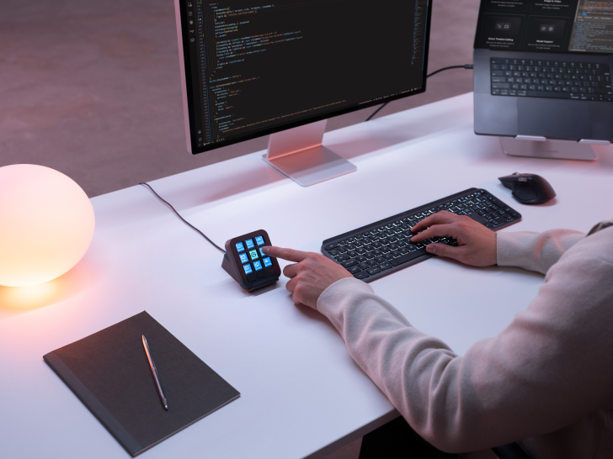
Logitech has just thrown a new device into the increasingly crowded world of developer tools: the MX Keypad, which the company is billing as the first MX AI control center built for multi-app, multi-agent coding. At the launch, Logitech was clear about one thing — this isn’t another mouse, and it isn’t an AI brain bolted onto your desk. It’s something narrower and, if the pitch holds up, more useful: a physical shortcut layer that sits on top of the AI coding tools developers already use.
Not a Mouse Replacement — A New Desk Citizen
The first question worth asking about any new input device is the obvious one: is this going to replace something I already own? I put that directly to Logitech’s spokespersons at the launch, and the answer was unambiguous. MX Keypad is not meant to double up as a mouse. Your mouse stays exactly where it is. Instead, MX Keypad is designed to let developers assign multiple shortcuts to physical keys — shortcuts that would otherwise mean digging through menus, memorizing keyboard combinations, or breaking flow to switch between tools. The idea is time saved and friction removed, not a cursor replaced. Practically, that means desks get one more device, not one fewer.
AI-Controlled, Not AI-Powered
The second question cuts to the heart of what MX Keypad actually is, because “AI” gets attached to a lot of hardware these days that has nothing genuinely intelligent inside it. When asked directly whether the device is AI-powered, Logitech’s team drew a clear line: MX Keypad is AI-controlled, not AI-powered. There’s no AI model running on the device itself. What it does is give AI application developers faster physical access to the key pages, functions, and commands of the AI tools they’re already working in — effectively a control surface for AI workflows, not an AI product in its own right. That distinction matters for anyone expecting on-device intelligence; what they’re actually getting is a very configurable macro pad for an AI-heavy workflow.
Solving the Multi-Tool Juggling Problem
Logitech’s underlying argument is that modern coding has become an exercise in context-switching. Developers now move constantly between an IDE, a terminal, an AI coding assistant, and a handful of agent-based tools — and each switch costs time and attention. MX Keypad’s pitch is cross-app compatibility with major coding platforms, letting developers unify their AI workflows, prompts, and dev tools into something closer to a continuous flow rather than a series of interruptions. Anatoliy Polyanker, VP and GM at Logitech, described the device as putting a physical control center within a developer’s reach, letting them manage their AI workflows more quickly and intuitively.
Out of the box, MX Keypad ships with plugins built and tested by developers for two of the most widely used AI coding tools: GitHub Copilot and Claude Code.
The GitHub Copilot Integration
Logitech didn’t build this in isolation. MX Keypad comes out of close collaboration with GitHub, and it launches with native integration covering VS Code and the GitHub Copilot app, with more tool coverage planned over time. Every unit includes three free months of GitHub Copilot Pro+, redeemable through Logi Options+, available to both new and existing Copilot users. GitHub’s Martin Woodward, VP of Developer Relations, summed up the intent simply: the best developer tools stay out of a developer’s way, and MX Keypad is meant to fold Copilot into the workflow so naturally that developers spend less time managing tools and more time building.
Built to Be Customized, Not Just Used
The real long-term value for developers may sit less in the out-of-box plugins and more in the Logi Actions SDK, which lets software engineers build their own custom tools for the device. Logitech says the documentation is AI-friendly enough that coding agents can generate custom integrations directly from the SDK — turning what might have been a multi-day project into an afternoon’s work. That openness has already produced results: community-published plugins for Claude Code and OpenAI Codex are live on the Logi Marketplace, giving developers real-time agent status tracking and CLI control from physical keys, across a compatibility base Logitech pegs at over 100 million devices.
Cost: INR 15,999
MX Keypad also carries Logitech’s sustainability push forward — the graphite-colored model uses 64% certified post-consumer recycled plastic, and the packaging is FSC-certified paper. It will be available in India in the Graphite variant at INR 15,999.
The Bottom Line
Strip away the launch-day language, and MX Keypad’s value proposition for developers is fairly specific: it doesn’t replace hardware you already use, and it doesn’t add AI capability that wasn’t there before. What it does is shorten the physical distance between a developer’s hands and the AI tools they’re already relying on — Copilot, Claude Code, and whatever else gets built for it through the SDK — turning repetitive navigation into single keypresses. For developers already deep in multi-agent, multi-tool workflows, that kind of friction reduction, however incremental it sounds, is exactly the sort of thing that adds up over a working day.


No responses yet